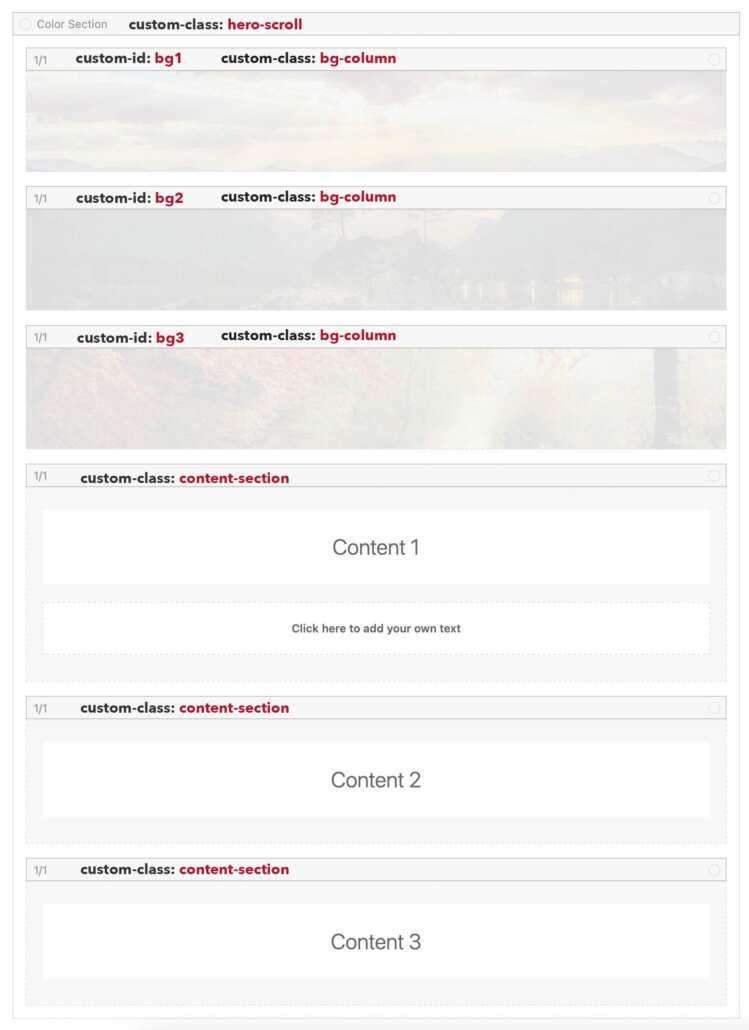
Content 1
Click here to add your own text
Content 2
Content 3
See Layout below on the right side
Click here to add your own text
See Layout below on the right side
#top .avia-section.hero-scroll {
 /* === set by the script itself  height: 300vh;  === */
  position: relative;
  clip-path: inset(0 0 0 0);
}

#top .avia-section.hero-scroll .container,
#top .avia-section.hero-scroll .content {
  padding: 0;
}

#top .hero-scroll .entry-content-wrapper .flex_column.bg-column {
  position: fixed;
  top: 0;
  left: 0;
  width: 100%;
  height: 100vh;
  margin: 0 !important;
  background-size: cover;
  background-position: center;
  transition: opacity 0.3s ease;
  display: flex;
  align-items: center;
  justify-content: center;
}

#top .hero-scroll .entry-content-wrapper .flex_column.bg-column:before {
  content: '';
  position: absolute;
  width: 100%;
  height: 100%;
  visibility: visible;
  background: rgba(0, 0, 0, 0.2);
}


#bg1 { opacity: 1; }
#bg2 { opacity: 0; }
#bg3 { opacity: 0; }

#top .hero-scroll .entry-content-wrapper .flex_column.content-section {
  position: relative;
  height: 100vh;
  display: grid;
  z-index: 10;
  align-items: center;
  align-content: center;
}
<script>
    // CONFIGURATION - Only change the number of images here
    const NUM_IMAGES = 3;

    // Automatically adjust container height of the color-section
    document.querySelector('.hero-scroll').style.height = (NUM_IMAGES * 100) + 'vh';

    // Automatically fetch all background elements
    const backgrounds = [];
    for (let i = 1; i <= NUM_IMAGES; i++) {
        backgrounds.push(document.getElementById('bg' + i));
    }


    window.addEventListener('scroll', () => {
        const scrollPos = window.scrollY;
        const windowHeight = window.innerHeight;

        // Calculate scroll progress (0 to 1)
        const progress = scrollPos / (windowHeight * NUM_IMAGES);

        // Calculate threshold values (for example for 3 images: 0.33 and 0.66)
        const thresholds = [];
        for (let i = 1; i < NUM_IMAGES; i++) {
            thresholds.push(i / NUM_IMAGES);
        }

        // Kreuzblenden zwischen den Bildern
        for (let i = 0; i < NUM_IMAGES - 1; i++) {
            const threshold = thresholds[i];
            const prevThreshold = i > 0 ? thresholds[i - 1] : 0;

            if (progress >= prevThreshold && progress < threshold) {
                // Transition from image i to image i+1
                const fadeProgress = (progress - prevThreshold) / (threshold - prevThreshold);
                backgrounds[i].style.opacity = 1 - fadeProgress;
                backgrounds[i + 1].style.opacity = fadeProgress;

                // All others to 0
                for (let j = 0; j < NUM_IMAGES; j++) {
                    if (j !== i && j !== i + 1) {
                        backgrounds[j].style.opacity = 0;
                    }
                }
            }
        }

        // Last image remains visible
        if (progress >= thresholds[thresholds.length - 1]) {
            for (let i = 0; i < NUM_IMAGES - 1; i++) {
                backgrounds[i].style.opacity = 0;
            }
            backgrounds[NUM_IMAGES - 1].style.opacity = 1;
        }
    });
</script>